— THE COMPANY YOU BRING TO YOUR PROJECT
Bring the vision.
Meet your
company.
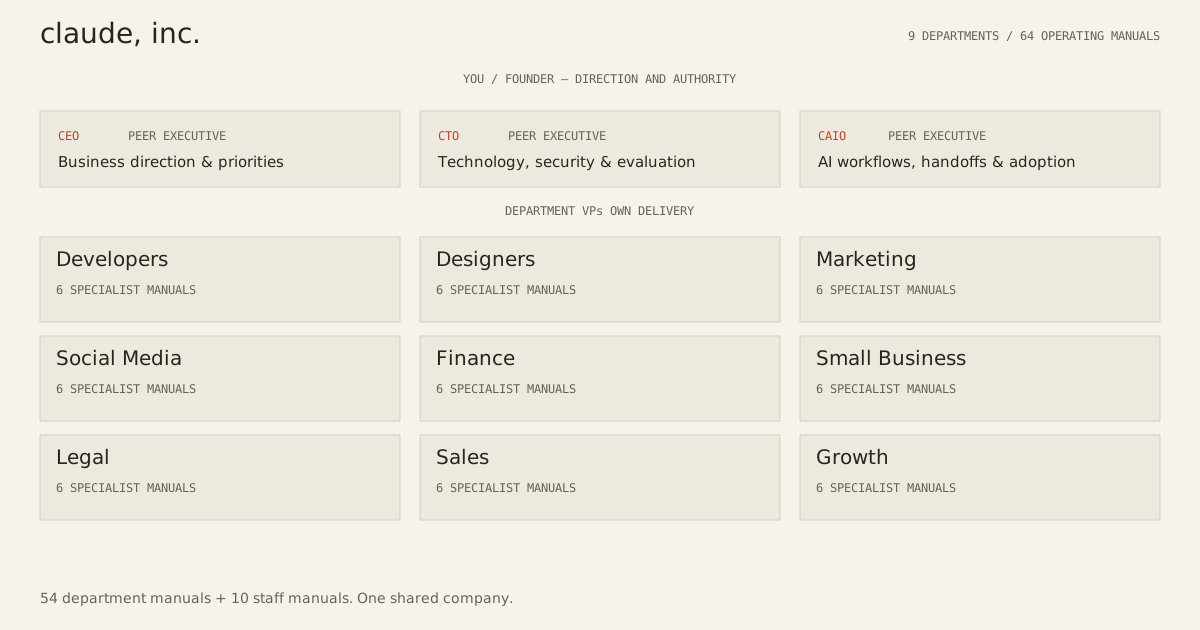
Nine business departments, supported by peer CEO, CTO and CAIO executives in Claude Code. From the first idea to the next release, your whole company works from one project.
Your files. Your decisions. A company that remembers the work.
The direction.
Business direction.
Priorities & arbitrationTechnical direction.
Architecture, skills & security ↗CLAUDE · CAIOAI operating quality.
Workflows, handoffs & adoption ↗9 departments · 54 employee skills · 10 staff skills
64 operating manuals, one shared company
Development source: 1.6.0-dev.0 (unreleased), with nine departments and 64 manuals. The latest published release, v1.5.1, has eight departments and 54 manuals with CEO and CTO.
You set the direction.
The company carries the work.
01 / MEET YOUR COMPANY
The right expertise.
Under one roof.
Browse every department and its six employees. Each skill has a job, a workflow, and a quality bar.
EXECUTIVE OFFICE / CTO
Technology that serves
the business.
CEO, CTO and CAIO lead together. The CEO sets business priorities and arbitrates tradeoffs. The CTO owns architecture, agent infrastructure, security, skills, and code quality, bringing technical facts and options to the CEO for business decisions. The CAIO advises on cross-team workflows, handoffs, reliability and adoption; department VPs retain delivery ownership.
EXECUTIVE OFFICE / CAIO
AI work that delivers
accepted outcomes.
The CAIO improves cross-team process design, shared context, handoff quality, operational reliability and adoption. Four specialist manuals support focused diagnosis and measured improvements. The CEO owns priorities and project decisions; the CTO owns technical and security acceptance.
THE SIX EMPLOYEES OPEN A DELIVERABLE FORMAT TO SEE THE WORK
COMPANY STAFF
Continuity for the project. Accountability for the spend.
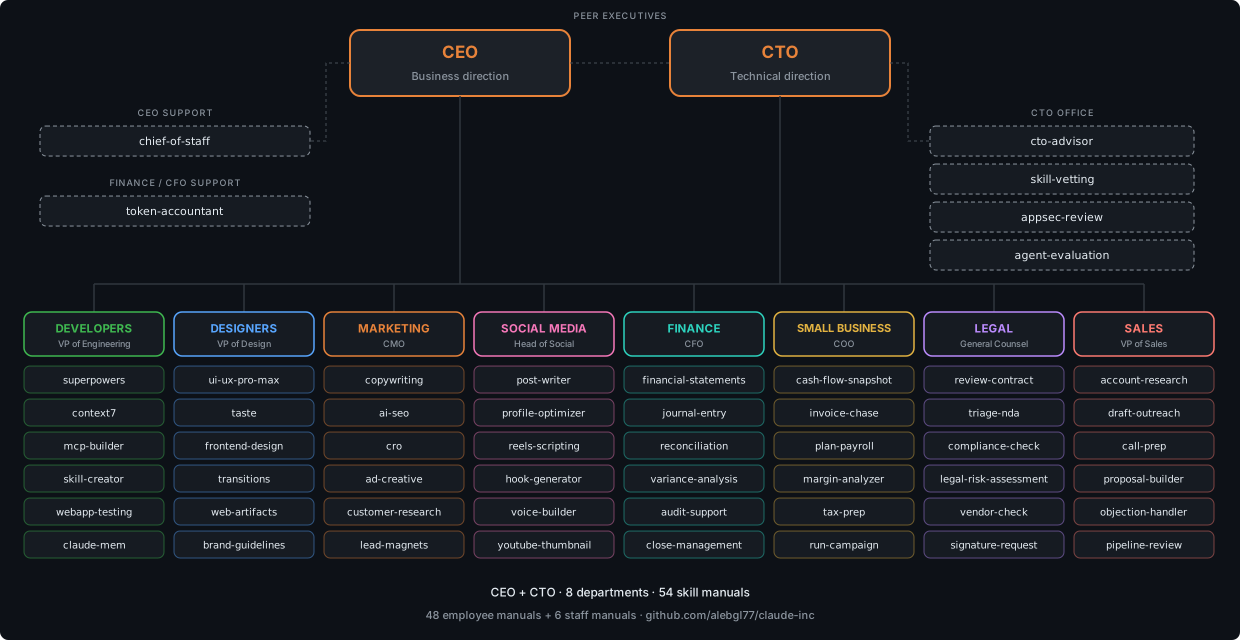
THE WHOLE COMPANY / 64 OPERATING MANUALS
Every specialty, connected.
Peer CEO, CTO and CAIO executives, nine departments, and the manuals available to your project.
Scroll across the map to explore all nine departments.
03 / RETURN TO YOUR PROJECT
See where the
company stands.
Open the project state saved by the CLI to see actual recorded tasks, dependencies, and reviews.
Read-only snapshot. Reopen the file to refresh it. Recorded statuses and reviewer names are supplied data; this page does not verify artifact files or execute reviews.
Or paste a project snapshot
In your project terminal, run company project status --format json and copy its output here. This is useful if your browser cannot read local files.
Read in this tab only. Cleared after a successful import or when you close the snapshot.
Recorded decisions
Your company’s work will appear here.
Start a local project below, then open its saved state.
04 / MAKE IT YOUR COMPANY
Bring something
you want to build.
Start with your own project, at any stage. The entire company is available; your brief gives it a direction.
Install the company.
Install the CLI and company files using the repository instructions. You’ll need Claude Code and Python 3.9+ locally.
Open installation instructions ↗Download your project brief.
Use the form here. Put
company-brief.mdin the project folder where you want the company to work.Initialize, then start.
In a terminal inside that project folder:
company project init --name 'My project' --brief-file company-brief.md
company project start
Replace the fixed sample name in your terminal if you want. Start opens a local Claude Code session with the company and saved project context.
Run company project status to read your persistent board. Tasks, dependencies, and reviews are stored with the local project.