AI Factory

Technical atlas · 01 to 05

Architecture
of the Factory

Follow a task from the workstation to the local model, through its access controls and back to a human decision.

10
zones on the plan
4
example business units
2
databases in the decision workflow

01 · Logical view

Services and trust boundaries

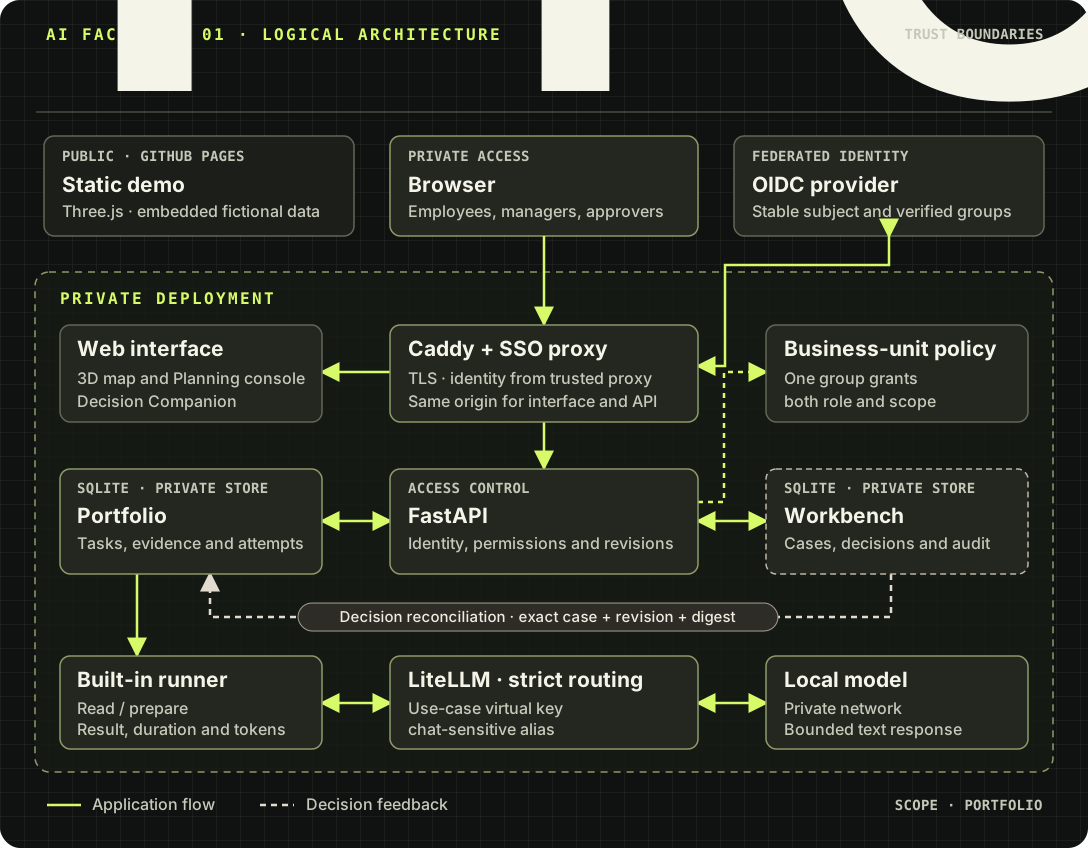
GitHub Pages serves a static demo with fictional data. In a private deployment, Caddy exposes the interface and API on the same HTTPS origin. The SSO proxy verifies identity with the OIDC provider. FastAPI then applies user or service-account rights to the business unit associated with the use case.

On Compose, Caddy and the API share a private identity network. On Kubernetes, Ingress terminates HTTPS and Caddy, OAuth2 Proxy and the API share the pod’s loopback interface. The API pod uses a PVC. The logical diagram follows a task and its decision.

Public and private flows from the browser to the API, portfolio, Workbench and local model.
Portfolio workflow. Open the full-size diagram.

Identity and data

The trusted proxy supplies the stable subject. The same SSO group must grant both the role and the business-unit scope. The API filters use cases, profiles, bookings and results before returning them. Workbench cases and portfolio tasks reside in separate private SQLite databases.

Execution and reconciliation

The built-in runner claims eligible subtasks and calls the local model through LiteLLM in strict mode. The runner keeps provider token counts when available. Workbench reconciliation runs in the background independently of the runner.

02 · Overhead view

2D floor plan and room functions

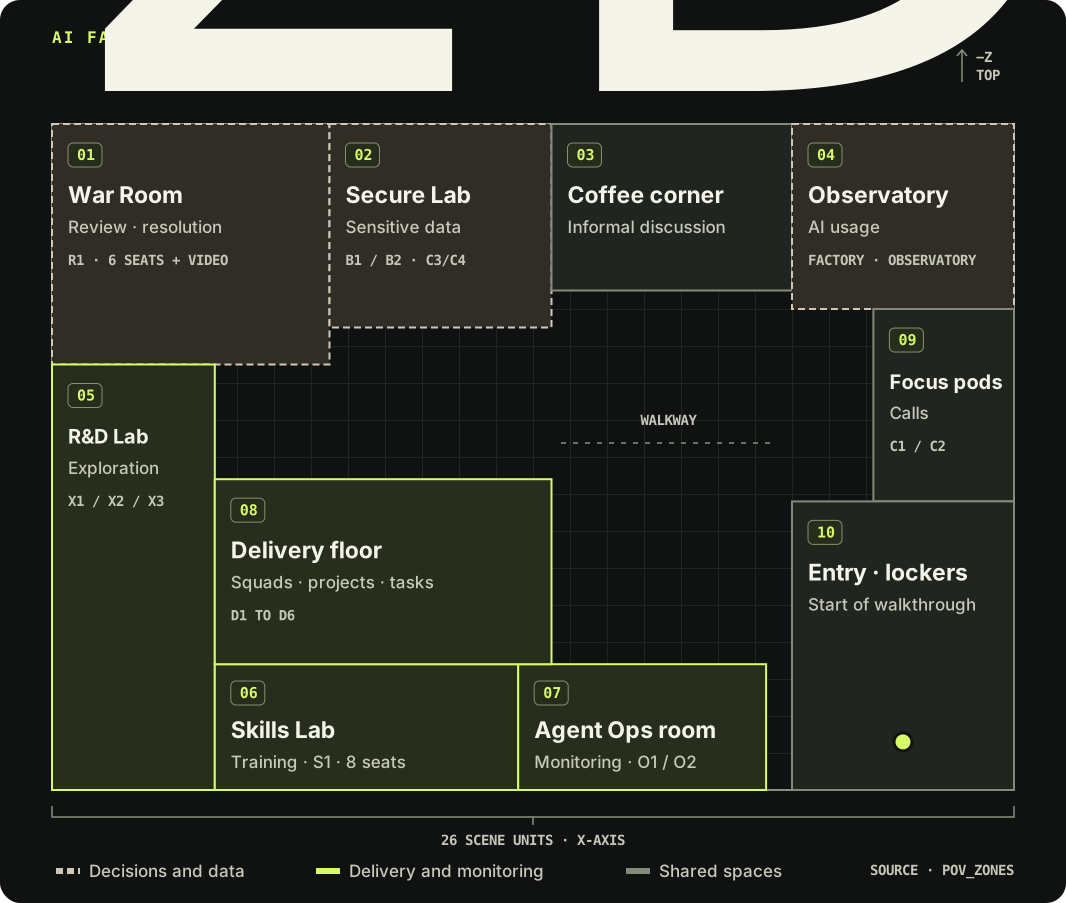
The plan draws the footprints of the 3D scene to scale, with −Z at the top. The rooms provide wayfinding in the demo. The business-unit policy determines access in a private deployment.

Overhead view of ten numbered zones with the War Room and Secure Lab at the top, the Delivery floor in the center and the entrance at the lower right.
Room footprints and resources. Enlarge the plan or open the Factory and select Plan.
01 War Room

Purpose. Review and resolution in room R1 with six seats and video conferencing.

Actions. Book a review and run a simulated discussion. For an audited decision in a private portfolio, open the Companion with Workbench permissions.

02 Secure Lab

Purpose. Workstations for sensitive data. Scene labels L1 and L2 correspond to policy identifiers B1 and B2.

Actions. Book an authorized workstation for a C3/C4 case. The example policy assigns B1 to HR and B2 to Finance.

03 Coffee corner

Purpose. Collect improvement ideas from people and agents.

Actions. Visit the area in walkthrough mode. In versions with the idea box, open the wall, post an idea and check its assigned category.

The demo keeps idea notes in the browser. In a protected installation, authenticated Factory users can see ideas as soon as they are posted. A badge identifies the posting source, and the category describes the topic. The source is a verified business unit or Factory Administration for a global administrator without a verified unit.

A global human administrator can look up the author’s identity separately. The system audits that lookup.

04 AI Usage Observatory

Purpose. Aggregate AI usage and track tools and alternatives.

Actions. Open it from the 3D room or the Factory menu. In a private deployment, dedicated groups filter teams by business unit. Decisions and imports require explicit global access in the relevant group.

05 R&D Lab

Purpose. Explore the X1 to X3 test benches. Actions. Inspect a bench and open the Skills Lab & R&D Lab console view.

Open the AI Flow Lab to connect components, replay fictional scenarios and compare routing, security and usage outcomes.

06 Skills Lab

Purpose. Training and skill sharing in the eight-seat S1 room. Actions. Check sessions and the schedule, then book within your scope.

07 Agent Ops room

Purpose. Monitor agents at consoles O1 and O2. Actions. Review Agent Ops metrics and examine an attempt’s result and duration in the portfolio before resuming work.

08 Delivery floor

Purpose. Squad area with workstations D1 to D6. Actions. Find business-unit work in Planning → Portfolio and tasks. Plan, assign, delegate or submit according to your role.

09 Focus pods

Purpose. Two individual booths, C1 and C2, for calls. Action. Check availability and book a resource assigned by the operator policy.

10 Entrance and lockers

Purpose. Scene entrance and starting point for the walkthrough, marked by the teal dot on the plan. Actions. Get your bearings, switch to Plan and visit a room.
03 · Business boundaries

Business-unit and role matrix

The business units and subjects below come from the example configuration. The operator maps each group to business cost centers, profiles, resources and teams. Portfolio roles build on this policy.

Example scope configuration
Business unitSSO groupWorkstation and profileObservatory teams
Operations cc-opsbu-operationsD1 · p02Operations
Customer relations cc-relationbu-relationD2 · p03Customer relations and marketing
Human resources cc-rhbu-rhSecure B1 · p06Human resources
Finance cc-financebu-financeSecure B2 · p07Finance
Governance ["*"]factory-governance-adminR1 · cross-unitAccording to the group’s global role
Responsibilities in a private deployment
RoleActionsControl
Factory leadership adminManage objectives, indicators and projects.Role and global scope ["*"] in the same group.
Project lead project_leadCreate and plan tasks for the business unit.Portfolio role declared for this scope.
Manager managerAssign, delegate and authorize a start that requires approval.Eligible agent and business-unit autonomy policy.
Architect architectReview evidence for a technical deliverable.Architect distinct from the submitter.
Assigned employee or agentView the task, start when eligible and submit evidence. An eligible agent can report usage according to execution mode.Verified subject, active assignment and business-unit use case. Agents require a passing evaluation.
Workbench approver approver or adminApprove, reject or request changes to the submitted revision.Global ["*"] group and separation from the task’s submitter and architect.

04 · Sequence

From task to decision

  1. 01Plan

    The project lead defines the task and its dependencies.

  2. 02Assign

    The manager chooses an agent or starts automatic selection.

  3. 03Execute

    An eligible agent prepares the result and submits evidence.

  4. 04Review

    A separate architect reviews the task when technical review is required.

  5. 05Decide

    A sensitive task enters Workbench handoff. The Companion records the decision.

Approve → Completed

Dependent tasks can resume.

Reject → Cancelled

Dependencies that require successful completion stay blocked.

Request changes → Ready

A new submission opens a separate case.

Delegation and recovery

An active parent can have up to four subtasks, including cancellations, one level deep. They stay in its project and business unit. Dependencies, assignment and the autonomous, human-approval or blocked policy govern when work can start.

The runner checks the parent’s execution and project revision before applying a result. It discards stale responses.

Decision scope

The API matches the case, revision and digest, then returns the outcome and timestamp to the portfolio. The decision rationale and decision-maker’s identity stay in Workbench.

A CRM or ERP operation follows the approved connector workflow. The portfolio decision covers the prepared work.

05 · Operating conditions

Controls to qualify in private

Qualification checkpoints
ControlExpected behaviorQualification evidence
Business-unit isolationRole and scope come from the same SSO group. A C3/C4 case requires a secure resource for bookings.Check cross-unit denial and refusal of a workstation outside the authorized scope.
Local gatewayA per-case virtual key and the chat-sensitive alias constrain routing. The built-in runner uses text output from the local model.Run a synthetic subtask, observe its duration and check token count provenance.
Authorization and concurrencyThe start grant is single-use. Mutations use the current revision. Late results remain bound to their originating attempt.Simulate reassignment and restart. Renew the start grant if still required.
Decision and auditportfolio mode requires Workbench auditing. The two databases reconcile using the exact case identity and revision.Test all three outcomes with a separate approver and restart between decision and display.
Delivery and restoreThe documented deployment uses one API process and digest-verified images. The Compose api-state volume or Kubernetes PVC preserves the databases and state.Verify attestations and target configuration, then restore a consistent backup in isolation.